![adcredo-knowledge-base-1.png]](https://support.adcredo.com/hs-fs/hubfs/adcredo-knowledge-base-1.png?width=300&height=72&name=adcredo-knowledge-base-1.png)
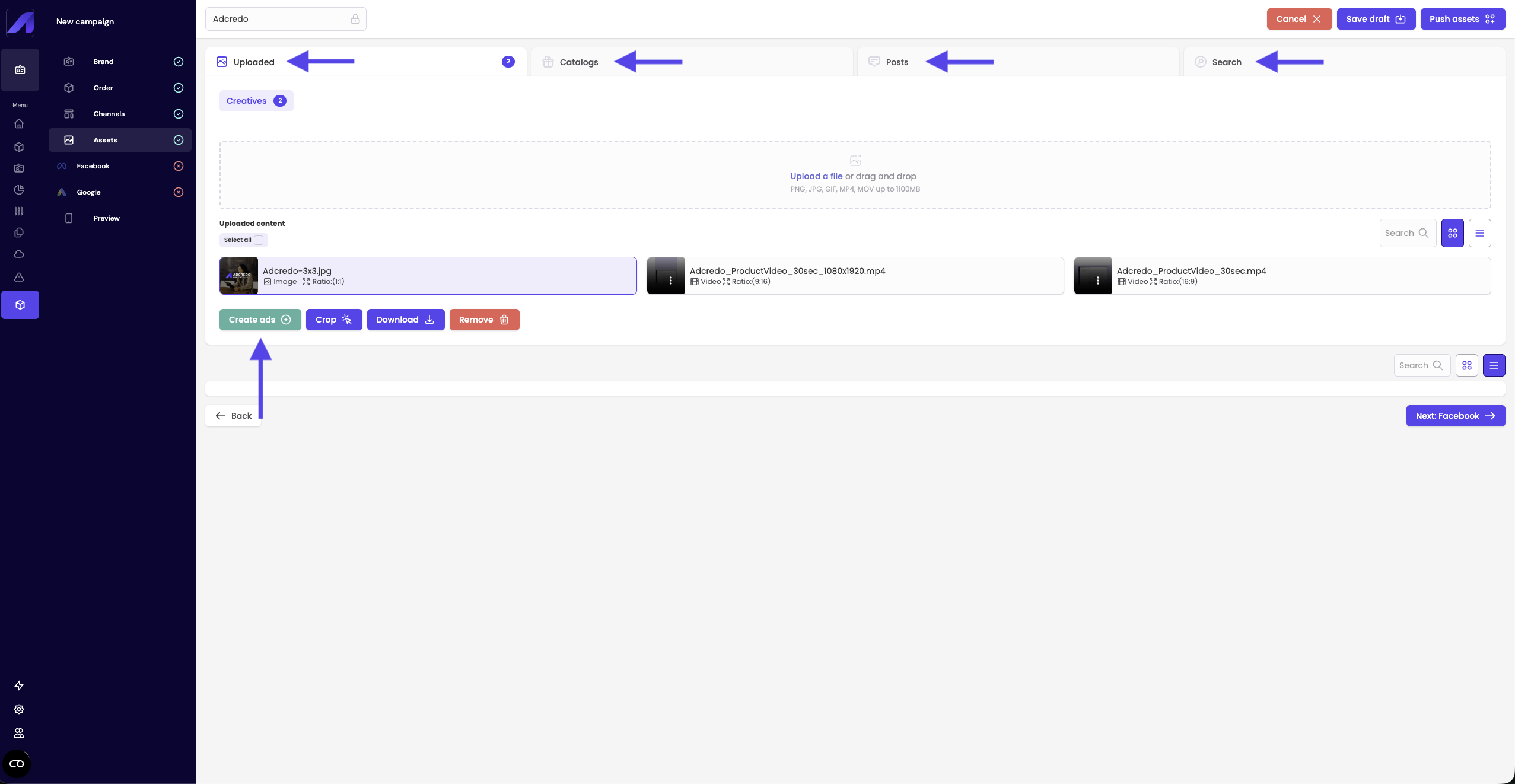
In the Assets step of the campaign builder, you manage all assets tied specifically to this draft.
Tabs include:
- Uploaded:
- Drag-and-drop or click to upload images and videos.
- Selected assets are used to build ads.
- Drag-and-drop or click to upload images and videos.
- Catalogs:
- For Meta catalog campaigns. You can select existing Meta catalogs (created in Meta, not in Adcredo).
- For Meta catalog campaigns. You can select existing Meta catalogs (created in Meta, not in Adcredo).
- Posts:
- Allows you to use organic posts in paid campaigns.
- Choose channel and page/account → posts load below → click a post to create an ad from it.
- Allows you to use organic posts in paid campaigns.
- Search (for Google/Bing):
- Keywords – create keyword lists.
- Text ads – create responsive search ads.
- Assets – create Google ad assets (call, sitelinks, image, callout, price, promotion, structured snippet, business name, business logo, location).
- Keywords – create keyword lists.
From Uploaded/Posts you can click Create ads to move into the Ad builder.